courtiful Text Messaging
Last updated: October 10, 2026
courtiful helps people organize tennis, pickleball, and padel sessions with their crews, and helps coaches fill their lesson schedules. Members who opt in can get texts about their own sessions and crews. Students who opt in can get their coach's open lesson times and lesson updates by text. Texting is optional: you can create an account, book lessons, and use every part of courtiful without it.
What we send
Session and crew notifications, only to members who opted in (below), and only the kinds they leave on Text in Settings → Notifications. Every session and crew text starts with “courtiful:” and ends with a courtiful.com link and “Reply STOP to opt out”. We never send marketing or promotional texts, and we never text people who have not opted in.
What we text today:
- Someone invites you to a session: “courtiful: Sam invited you to play Saturday Doubles, Sat, Oct 4, 9-11 am. courtiful.com/s/abc123 Reply STOP to opt out”
- Someone in your crew posts a session: “courtiful: New session in Park Slope Tennis: Sam posted Saturday Doubles, Sat, Oct 4, 9-11 am. courtiful.com/s/abc123 Reply STOP to opt out”
Once our carrier registration covers them, members who opted in may also choose texts for the kinds below. Until then we don't text them; they arrive in the app instead, and Text isn't offered for them in Settings.
- A session you’re in is cancelled: “courtiful: Session cancelled: Saturday Doubles, Sat, Oct 4, 9-11 am. courtiful.com/s/abc123 Reply STOP to opt out”
- A session you’re in changes time or place: “courtiful: Session changed: Saturday Doubles is now Sun, Oct 5, 10 am-12 pm. courtiful.com/s/abc123 Reply STOP to opt out”
- A player suggests another time for your session: “courtiful: Sam suggested Sun, Oct 5, 10 am-12 pm for Saturday Doubles. courtiful.com/s/abc123 Reply STOP to opt out”
- The organizer answers your time suggestion: “courtiful: Your time was accepted: Saturday Doubles is now Sun, Oct 5, 10 am-12 pm. courtiful.com/s/abc123 Reply STOP to opt out”
- The organizer removes you from a session: “courtiful: You were removed from Saturday Doubles. courtiful.com Reply STOP to opt out”
- Friend requests: “courtiful: Sam sent you a friend request. courtiful.com/friends Reply STOP to opt out”
- Someone accepts your friend request: “courtiful: Sam accepted your friend request. courtiful.com/friends Reply STOP to opt out”
- Crew invites: “courtiful: Sam invited you to join Park Slope Tennis. courtiful.com/crews Reply STOP to opt out”
- Tournament matches: match times, scores to confirm, results, partner requests: “courtiful: Your Semifinal match vs Alex in Fall Open is set for Sat, Oct 4, 9-11 am. courtiful.com/s/abc123 Reply STOP to opt out” or “courtiful: Sam reported 6-4, 6-3 for your Semifinal match in Fall Open. Please confirm it. courtiful.com/s/abc123 Reply STOP to opt out”
- Ladder matches: challenges, answer deadlines, scores to confirm, position changes: “courtiful: Sam challenged you on Club Ladder for your spot, #4. Answer by Thu, Oct 9. courtiful.com/ladders/abc123 Reply STOP to opt out” or “courtiful: You're now #4 on Club Ladder. courtiful.com/ladders/abc123 Reply STOP to opt out”
If you sign in with your phone number, we also text you the one-time verification code you asked for. That code is sent because you requested it and does not sign you up for any other texts.
How to opt in
Signing in never opts you in. When you sign in at courtiful.com/login or in our iOS app, you enter your phone number and we text you a one-time code. The sign-in screen only says “By continuing, you agree to our Terms and Privacy Policy.” Agreeing to those does not sign you up for texts, and there is no texting checkbox on it.
Right after you sign in for the first time (and once for existing members who have never been asked), courtiful shows a separate screen, “Get texts about your sessions?”, with two buttons: Text me updates and Not now. Nothing is pre-selected. We text you only if you tap “Text me updates”. “Not now” (or closing the screen) means no texts, and we don't ask again. The same screen is offered after you join a session from an invite link, and you can turn texts on or off any time in Settings → Notifications on the web and in our iOS app. Next to the button, it reads:
Invites, new crew sessions, and changes to sessions you're in, plus time suggestions, tournament and ladder match updates, and friend and crew requests. Msg frequency varies. Msg & data rates may apply. Reply STOP to opt out, HELP for help. Optional: you can use courtiful without texts.
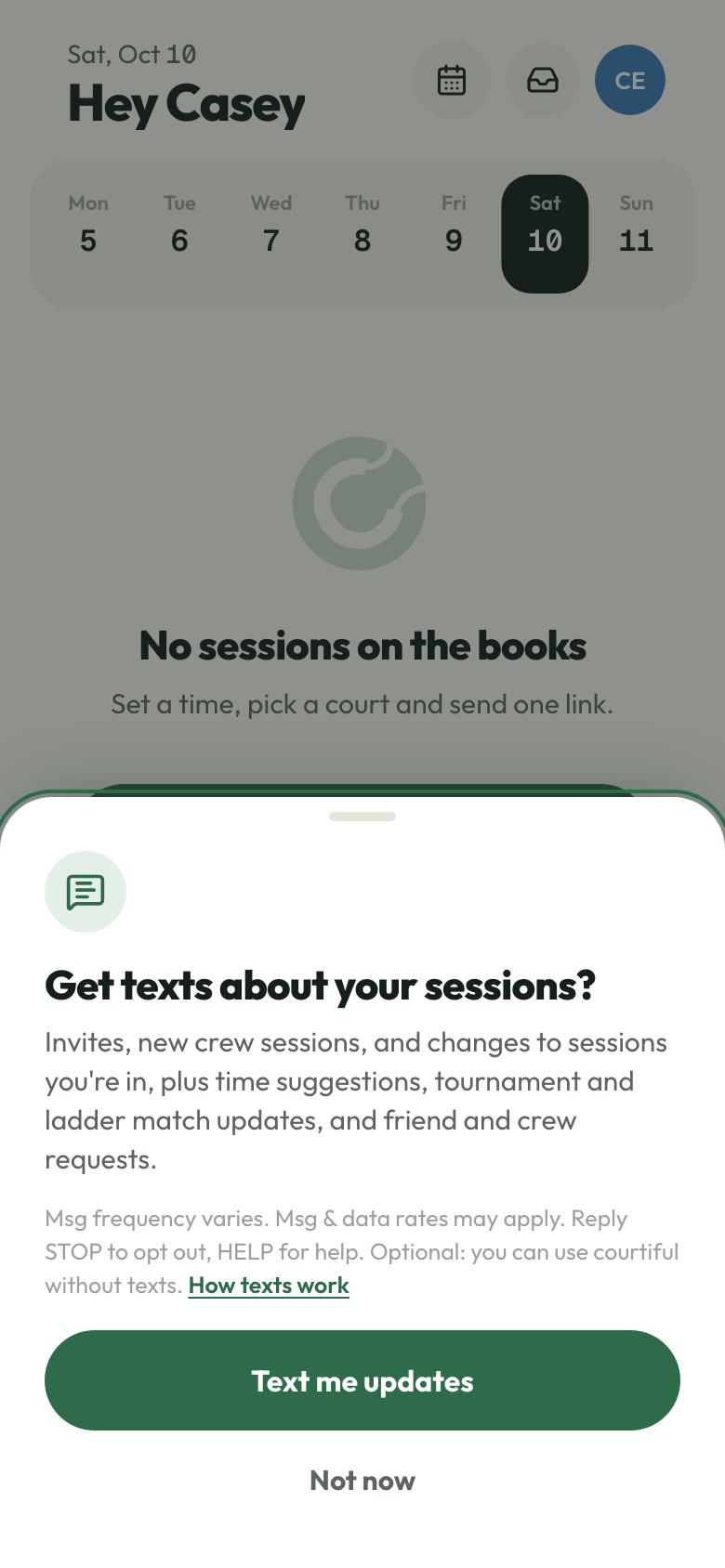
We record when you tapped “Text me updates”, the wording you saw, and the screen you tapped it on.
Right after opting in, you get this confirmation:
courtiful: You're opted in to texts about your sessions and crews: new sessions, invites, cancellations and changes, time suggestions, tournament and ladder match updates, and friend and crew requests. Msg frequency varies. Msg & data rates may apply. Reply HELP for help, STOP to opt out.
Accepting our Terms of Service or Privacy Policy does not opt you in to text messages.
Lesson texts from coaches
Coaches use courtiful to offer open lesson times to their students. A student who opts in gets texts from courtiful on behalf of that one coach:
- An open lesson time, for example: “Hi Sam, Carla Diaz has an open lesson Thu Oct 9, 4–5pm at Riverside Courts. First to say yes gets it: courtiful.com/o/abc123”
- An update about a lesson they booked, for example: “Hi Sam, Rain-out: your lesson Thu Oct 9, 4–5pm with Carla Diaz is cancelled. Your package lesson is credited back — you have 3 left.”
How students opt in. Adding a student's phone number to a coach's roster does not opt them in, and we never send the first text. The coach sends the student a personal link from the coach's own phone. The link opens a courtiful page that shows the number we would text and this checkbox, unchecked by default. When the student checks it and taps “Text me lesson times”, we text a one-time code to that number, and the student enters it on the page to confirm the phone is theirs. Lesson texts start only after that. Booking lessons does not require any of it. The checkbox reads:
Text me open lesson times and lesson updates (like rain-outs) from [Coach name], sent by courtiful. Msg frequency varies. Msg & data rates may apply. Reply STOP to opt out, HELP for help. Not required to book lessons. See our Privacy Policy and Terms of Service.
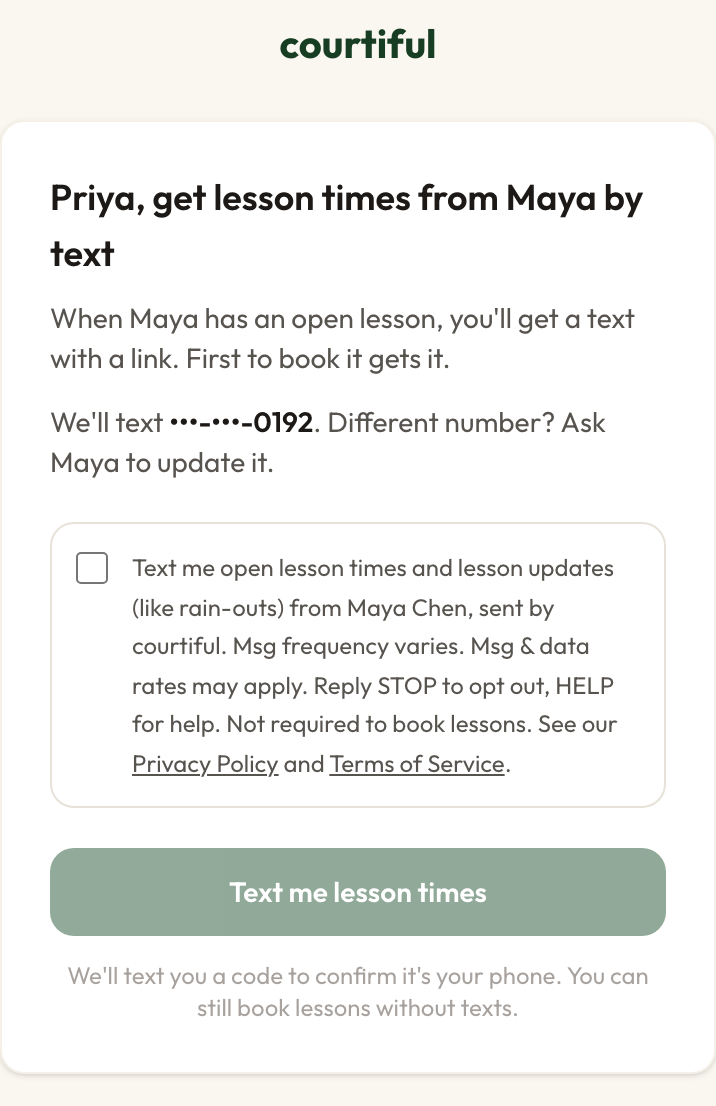
Right after opting in, the student gets this confirmation:
courtiful: You're signed up for open lesson times and lesson updates from [Coach name]. Msg frequency varies. Msg & data rates may apply. Reply HELP for help, STOP to opt out.
Opting in to one coach's lesson texts doesn't sign a student up for crew session texts or for any other coach.
Frequency and cost
Message frequency varies with your activity. Message and data rates may apply.
Help and opting out
Reply HELP for help, or email andrewahadad@gmail.com. Reply STOP to any message to stop all texts from courtiful. You will get one confirmation and no further texts. Reply START to opt back in.
Privacy
No mobile information will be shared with third parties or affiliates for marketing or promotional purposes. See our Privacy Policy and Terms of Service.